Experience realism with the dangers of fantasy in your very own RLCraft Server
RLCraft stands for Real Life or Realism, which this modpack helps to take your RLCraft Server Hosting to the next level of difficulty. For starters, Tough As Nails takes center focus inside of this modpack which adds in a newly created temperature and thirst system you’ll need to take care of. Topple that with the new First Aid health system, you’ll have to figure out how to manage your body in an entirely new ruleset and survival experience. And as if that wasn’t bad enough, you’ll need to watch out for the sleepless Bloodmoon nights that come after enough time passes by inside of the world.
- Take care of over a thousand different bounties inside of Bountiful
- Explore over 200 different kinds of quests provided through Better Questing
- Adjust to new weapons introduced in Spartan Weaponry for better defending yourself
- Advanced Fishing allows you to collect over 43 kinds of fishes even from inside of lava
Watch this Quick Start Video Guide to RLCraft…
Watch on YouTube
Hosting in RLCraft
RLCraft Server aims to change the way that works for your Minecraft journey, adding the feelings of realism to the journey of a fantasy world. With our RLCraft Server Hosting, you’ll be able to explore through this journey without any problems towards adventuring the vast world that’s out there or worry about potential client side issues to the server.
What to expect of RLCraft
It’ll take some time to adjust to this new journey that you will be embarking on even if you are with friends. For starters you’re going to need to adjust to new skills introduced in Reskillable in this modpack. These skills limit the ability to just craft and obtain an Iron Sword with ease, making it to where you need to adjust to the world at hand and the materials that offer itself up upon you. Don’t think you can just settle down and grind your way through however, especially when you could have the Ice & Fire Dragons come at any given point to spell some trouble for your home, you need to be on the move while getting yourself an established point to return back to.
Everything isn’t always against you however when you want to take your journey to the next level. The developers behind this Minecraft Modpack didn’t want to leave you feeling defeated just because you aren’t used to this journey, so one of the biggest things they’ve done is tailor make everything to help teach the player from every death to every mistake that could be done all so you can enjoy a better experience overall.
So what are you waiting for? Start hosting a RLCraft Server today and explore the journey the development team has made for you.
RLCraft Guide for Beginners
If RLCraft is still handing your butt on a silver platter, then no sweat. We here at StickyPiston have made a guide to help your experience through the beginning of the modpack in order to improve the start of your journey. We also left a few tips and tricks that you might want to take a gander at.
To get yourself started, you’ve probably experience that you will be dying a lot throughout the beginning, but that’s fine! Starting off like this helps you figure out what things you might want to avoid from the deadly dragons of the sky to the Lycanites mobs infecting the entire area. The images shown below are some of the mobs that you’ll want to be avoiding for the time being.
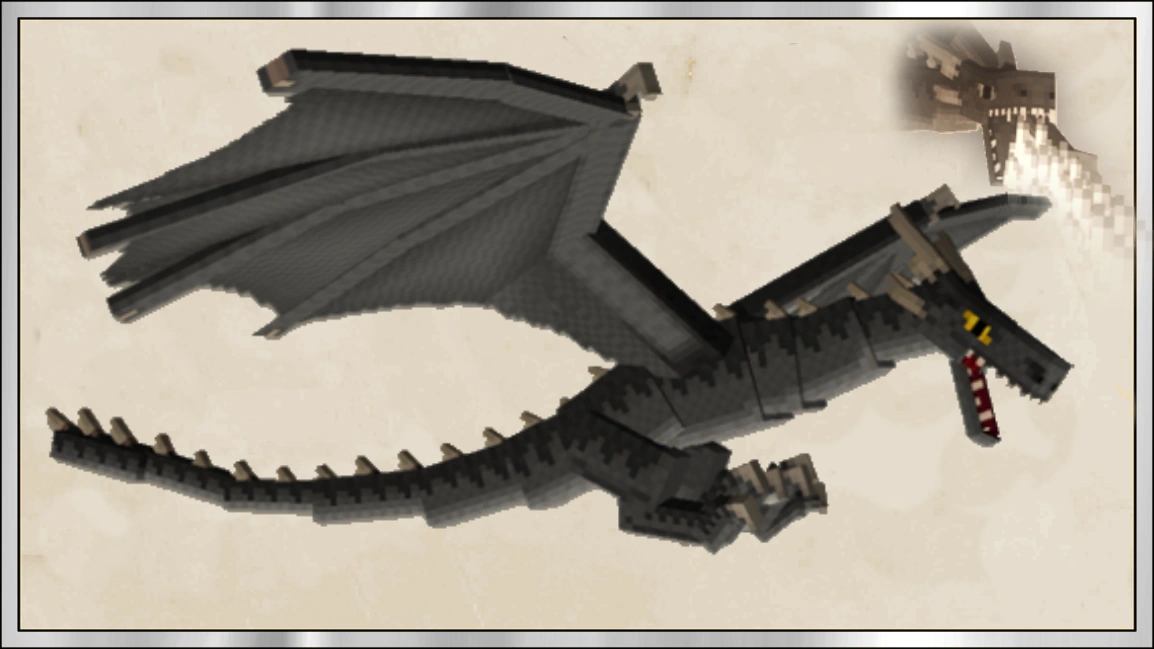
A Dragon in RLCraft.
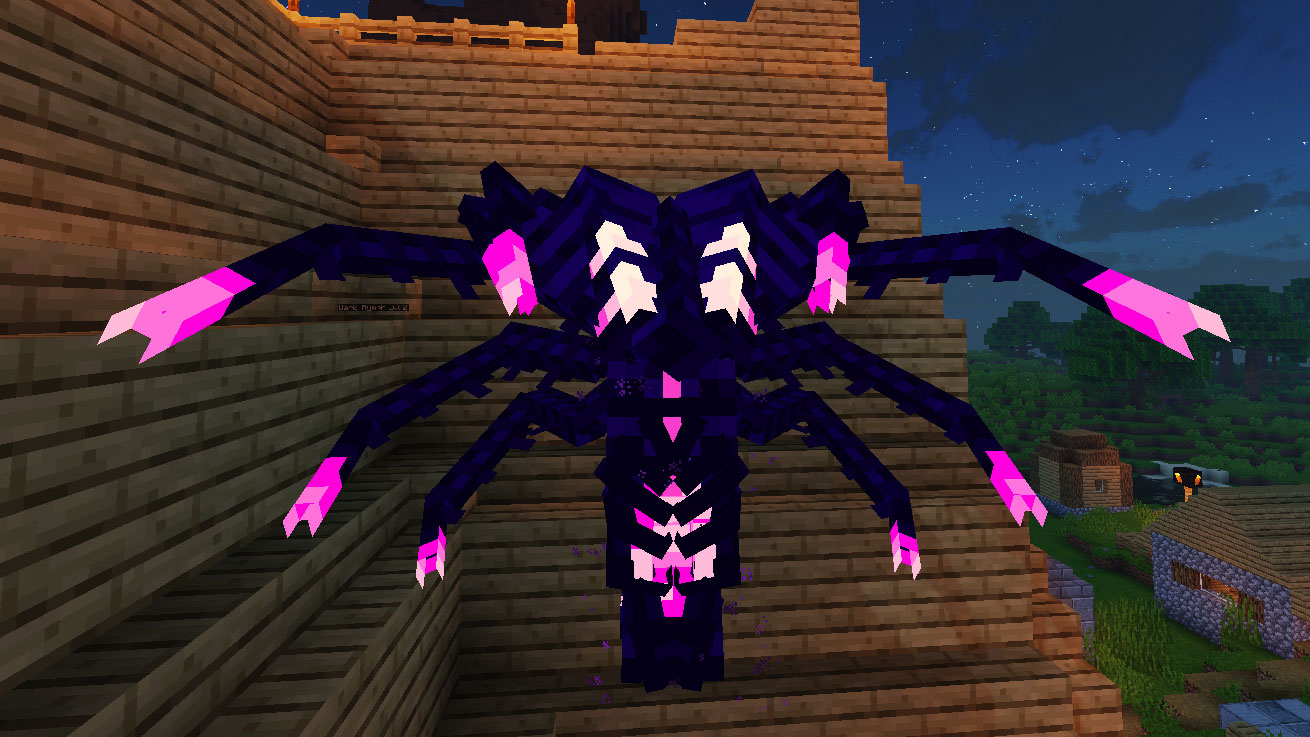
One of the Hostile Lycanites Mobs called Spectre.

A Lycanites Roc carrying a hostile Lycanites Mob to drop onto the player.
Now that you see what you have to avoid, let’s get to telling you what you need to be doing to survive.
What should I do when I Begin RLCraft?
To start off you want to be able to find some gravel and mine through it until you can get yourself some flint (recommendation? Get at least 8-10 pieces). After you have enough pieces you’ll want to right click stone on the ground in order to get some Flint Shards. Once you do, punch leaves from a tree to get a stick then craft one of these shards with the stick in your crafting grid to obtain a Flint Knife. You’ll want to craft a few of these knives to get you started. Just as a reminder, you need to right click objects to pick them up. Alternatively, you can also Crouch near the items to pick them up.
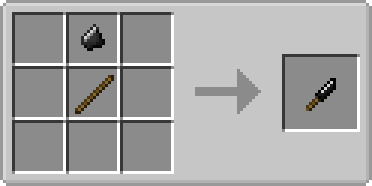
Once you have a few of these crafted, start swinging around at the grass until they break. You should be able to get some Plant Fiber in which you’ll be able to craft 3 of these together to create Plant String. These are important for crafting your Flint Tools.
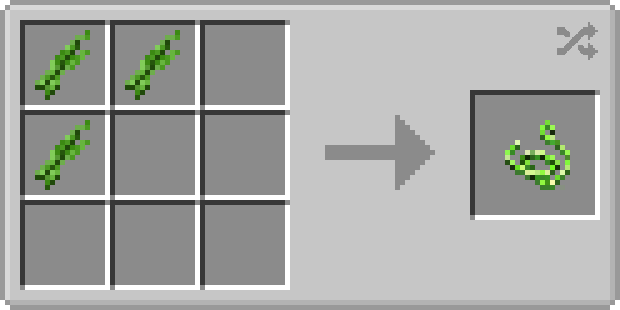
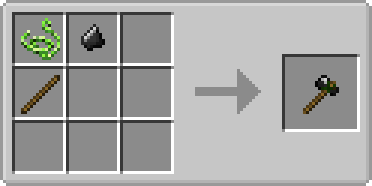
Once you have crafted the Flint Hatchet and Flint Pickaxe, it’s time to start doing some mining. You’ll want to mine as much stone as you can to obtain Rocks alongside a few bits of Coal to get yourself prepared for the journey ahead. Make sure you also chop down some trees with your hatchet. To get planks in this, you’ll need to set the logs down and right click on the top of them as this will be the only way you can get planks for now. To get sticks, do the exact same with the planks. Also to get Cobblestone to make Stone Tools, put the Rocks together in a 2×2 shape to get 1 Cobblestone.
You’re probably noticing it becoming night time by now, so if you have enough Plant String craft it into a 2×2 shape to get wool. With a Crafting Table you’ll be able to make a bed using the newly obtained wool and sleep the night away to not worry about dangers. When you sleep you’ll also be recovering 50% of your health!
RLCraft Tips and Suggestions
- It’s best that when you learn about Talents that you specialized in Combat. This helps with getting some fighting skills early on while also being able to easier help with combat. Random Crits for example gives you a 5% chance per level to gain a double damage hit (Crit) from any direct attacks. There’s more to look out for in places such as mining or crafting too, so be wary of all that’s available.
- Make sure that when you allocate experience to your Skills that you don’t overlevel everything. Keeping everything to a nice balance allows you to wield a versatile amount of weapons from Bows to Spears.
- Keep an eye on the temperature. Temperature is important as it can help you with not getting hypothermia or hyperthermia. Staying in cool water or wearing the proper clothing articles can help with keeping these in check.
- Get yourself a Saw Early on. Saws allow you to just craft things like wood into planks and or sticks into the crafting table for full value rather than having to rely on needing an axe to right click to get them.
- Once you have enough tools, get yourself a Paxel. It essentially acts like a multi-tool that mines at a diamond level and contains infinite durability. You will need to get your Building Skill up to Level 6 though if you want to put it together.
- Most importantly – keep vigilant on your quests. The quests are essentially a more detailed and interesting guide to help you from straying too far from being lost in the modpack. Getting all the help you can from the Quests is just a necessity to learn everything from the weapons to the mobs that you will encounter on your journey. DON’T forget it.
That’s about all you really need to know to start your way through the game. This should help you out at the start, but if you need more information that this small guide cannot provide, check over at the official RLCraft Wiki for a full guide to get your through the game. Also be sure to keep a watch on those quests! There’s more out there, but this should provide enough information.
Hosting a Minecraft RLCraft Server with friends is easy:
- Select the RLCraft Minecraft version.
- Follow the order steps and pay to have your RLCraft server connection info sent to your inbox.
- Login to Multicraft panel.
- Drag & Drop to upload your world with the World Manager.
- Configure mod configs with the control panel config editor.
What else can I do?
- Upload your world with the easy drag-and-drop World Manager.
- Whitelist your friends or make them co-owners.
- Customise config settings directly in the control panel.
- Add extra mods and plugins to your server for more fun.
- Explore 1756+ modpacks with the One Click & Play installer, completely free!
Want to play other servers?
Easy, use the Click & Play installer to add any server into an empty instance slot (no extra payments or 2nd servers needed!).
Outdated Server? Sorted!
If your server is ever outdated click the Update Server button to have the latest MC version installed, ensuring your friends can always join.
We’ve got you covered with a 14-day money back guarantee - so you can try us out, risk-free. Plus, our managed server support means you’ll never have to go it alone.
Need a break? Deep Freeze your server for just 1.00 (£$€) a month - pause it as long as you need and pick up right where you left off. No hassle, no stress, just flexibility.
So, who else would you trust with your RLCraft server?
We wish you the best Modded Minecraft Adventure ever! -- Stay Crafty
 US Panel
 EU Panel
 Aus Panel