How to Host a Vault Hunters 3 Server
Hosting an Vault Hunters 3 server for your friends is easy, even if you’re new to Minecraft Modpacks. in 3 easy steps :
- Click "Order Vault Hunters 3 Now" to get started.
- Pay and instantly receive your server details in your inbox.
- Log into Multicraft, Vault Hunters 3 is pre-installed and ready to join.
What else can I do?
- Upload your world with the easy drag-and-drop World Manager.
- Whitelist your friends or make them co-owners.
- Customise config settings directly in the control panel.
- Add extra mods and plugins to your server for more fun.
- Explore 1756+ modpacks with the One Click & Play installer, completely free!
Hunt down the vaults and become the ultimate Vault Raider on a Vault Hunters 3 1.18 Server
Vault Hunters 3rd Edition server is the 3rd version of the modpack based on the Vault Hunters mod, a mod which allows you to explore through tons of different vaults with the most unusual of loot and items. If you happen to see different loot on the ground in them, you can tell how rare they might be with Loot Beams coming off of them. Some of the rare items can come from the Mystical Tech mod that can get you to mess around with natural magics to form new and unique items. These items can eventually get powered up through generators inside of Powah!, giving strength beyond the masses.
- Upgrade Iron Generators to create tons of forge energy per tick
- Spruce up the biomes in Ecologics, adding in tons of vanilla-like features
- The Macaw’s Modded Series gives tons of decorations to build in style
- Xaero’s Minimap gives you access to a map to locate where you are on the world
Watch this Quick Start Guide to Vault Hunters 3 Server…
Watch on YouTube
Follow iskall85 over on his Channel
Quick Summary of Vault Hunters 3rd Edition
Vault Hunters is a series of modpacks that allows the player to develop their own talents and abilities. With a combination of over 2 million items from armors to idols, you’ll find yourself harboring less storage for all of the materials. The end goal of each pack is to collect around 16 to 25 unique artifacts and to forge them together to access the final vault. It’s the ultimate challenge where you will have to fight against the Final God Vaults to overcome it all.
What to Expect out of your Vault Hunters 3 Server
Dive into this Vault hunters 3 server hosting and explore the vaults around. Based on the Vault Hunters mod, you’ll need to search these ancient crypts that contain a lot of resources for your future expeditions. These resources can help you craft Colossal Chests for storage while also leveling up your knowledge. By leveling up this knowledge (alongside other abilities), you’ll be able to tackle more things inside of the vaults. Be careful as you continue to explore these vaults however as the goals will become more dangerous while harboring crazier rooms inside of them. So if you bring your Mining Gadgets with you to collect various ore to store into Sophisticated Backpacks, just be aware that you could lose it all.
Sky Vault World Generation
Vault Hunters 3 Server uses “terralith” as the default overworld generator. If you would like to start playing the Sky Vault right away, first open the World Manager in Multicraft, then choose the world Type option Template World > Sky_Vaults. Then click the Create World button and start your server. When you join the server you will be at the entrance to the Sky Vault.
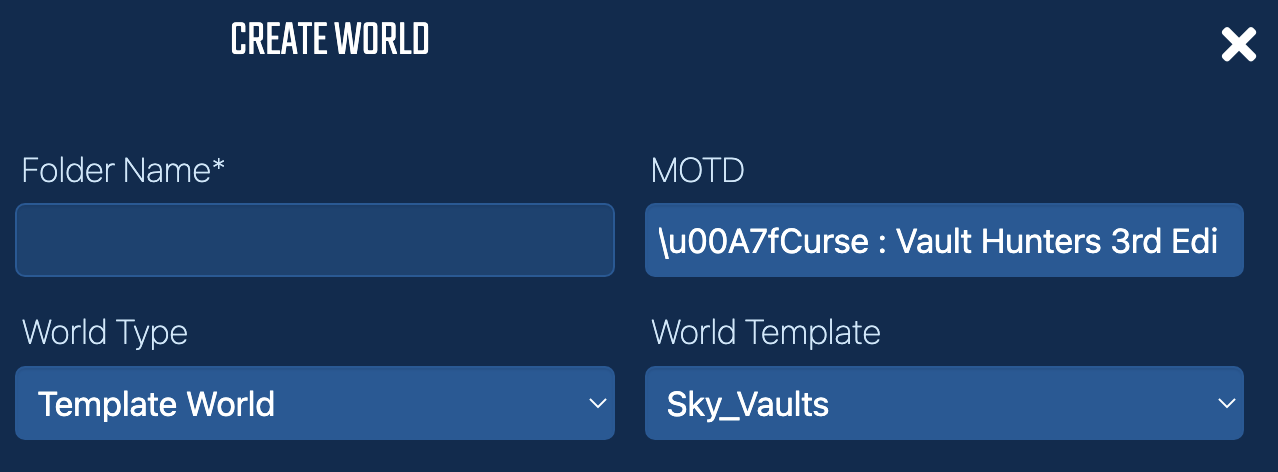
Vault Hunters 3 world generation for starting on the vaults
Read our World Manager guide to creating a New World
Why Choose StickyPiston for Your Vault Hunters 3 Server?
StickyPiston isn’t just another hosting company - we’re the ONLY Minecraft host with 15 years of experience dedicated exclusively to Minecraft. That means we live and breathe this game, just like you. Our obsession with Minecraft ensures you get the smoothest, most reliable hosting experience possible. More Reasons …
We’ve tackled 99% of server problems out there and fixed them, so you can focus on playing without interruptions. Our bulletproof, speed-optimized network keeps your server running flawlessly, letting you enjoy Minecraft all day long without a hitch.
And if something ever goes boom in the night? Our expert team is ready to jump in and help. These are hardcore Minecraft pros who know Vanilla, snapshots, Modpacks, and plugins inside and out. When they’re not helping you, they’re streaming, building minigames, doing MC quizzes or exploring the endless Minecraft universe themselves.
We’ve got you covered with a 14-day money back guarantee - so you can try us out, risk-free. Plus, our managed server support means you’ll never have to go it alone.
Need a break? Deep Freeze your server for just 1.00 (£$€) a month - pause it as long as you need and pick up right where you left off. No hassle, no stress, just flexibility.
So, who else would you trust with your Vault Hunters 3 server?
 US Panel
 EU Panel
 Aus Panel